
OKPKR Game Register – Create Your Account
Join OKPKR Game in a Few Simple Steps
Creating an account on OKPKR Game is quick and easy. Registration takes only a few minutes, allowing you to access all platform features, promotions, rewards, and gaming options. New users can sign up directly from their mobile devices and start using their accounts immediately after registration.
Why Register on the OKPKR Game?
An OKPKR account gives you access to all available features within the platform. Registered members can manage their profiles, participate in promotions, invite friends, and access customer support whenever needed.
Benefits of Registration
- Quick account creation process
- Easy login from any compatible device
- Access to bonuses and promotions
- Secure account management
- Referral programme participation
- Fast deposit and withdrawal options
- Customer support assistance
- Regular platform updates and rewards
How to Register on OKPKR Game?
Follow the steps below to create your account successfully.
Step 1: Download the OKPKR App
Download and install the latest OKPKR APK on your Android device from the official website.
Step 2: Open the Application
After installation, launch the OKPKR Game app from your device.
Step 3: Click the Register Button
On the home screen, tap the Register or Sign Up button to open the registration form.
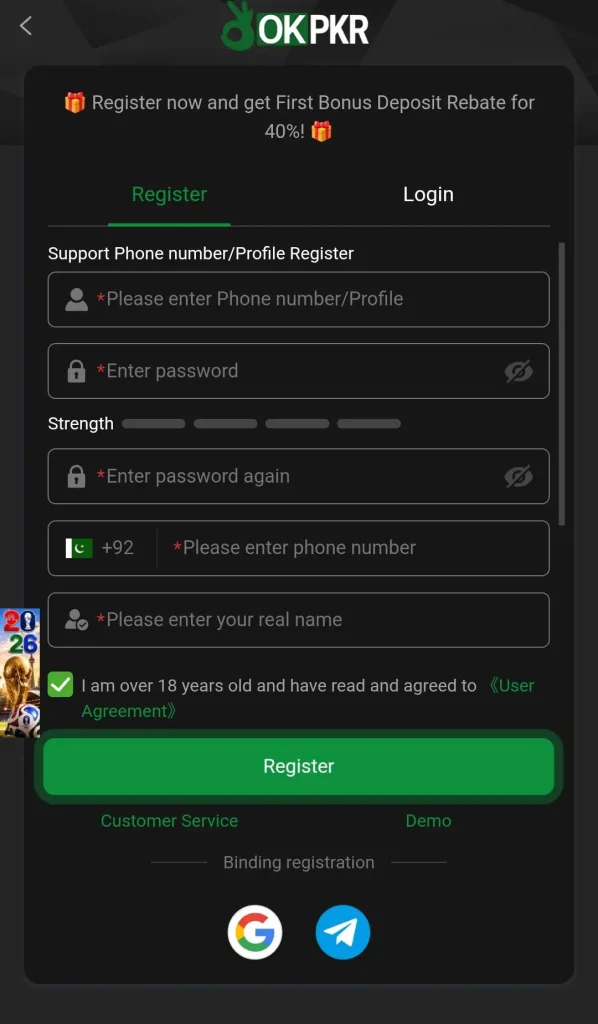
Step 4: Enter Your Information
Fill in the required details, such as:
- Mobile number
- Username
- Password
- Confirm password
- Referral code (optional)
Make sure all information is entered correctly.
Step 5: Submit Registration
After completing the form, tap the Register button. Your account will be created within seconds.
Step 6: Log In to Your Account
Use your username and password to access your newly created OKPKR account.
Registration Requirements
Before creating an account, ensure you have:
- A valid mobile number
- A secure password
- A stable internet connection
- An Android device with the latest app version installed
Tips for Creating a Strong Password
To keep your account secure:
- Use a combination of letters and numbers
- Avoid simple passwords such as 123456
- Do not share your password with anyone
- Update your password regularly
- Store your login details in a safe place
Common Registration Problems and Solutions
Mobile Number Not Accepted
- Check that the number is entered correctly.
- Remove any unnecessary spaces or symbols.
Registration Button Not Working
- Refresh the application.
- Check your internet connection.
- Restart the app and try again.
Verification Issues
- Confirm that your mobile number is correct.
- Wait a few minutes and try again if there is a delay.
Unable to Create an Account
- Make sure all required fields are completed.
- Update the application to the latest version.
Account Security Guidelines
Protecting your account is important. Follow these safety recommendations:
- Never share your password with others.
- Use only official OKPKR platforms.
- Avoid logging in on public devices.
- Log out after using shared devices.
- Contact customer support if you notice unusual account activity.
Referral Code Registration
If you received a referral code from a friend, you can enter it during registration. Referral codes may help users qualify for available referral rewards and promotional offers according to platform policies.
Start Your OKPKR Journey Today
Registering on OKPKR Game takes only a few minutes. Create your account, complete your profile, and enjoy access to all available features. Make sure your information is accurate and keep your login credentials secure for the best experience.